Core Gameplay Loop
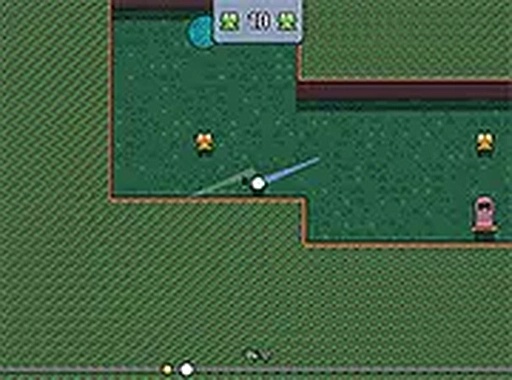
Fairway Frolic takes the familiar act of putting a ball and adds a layer of discovery. Instead of simply aiming for a hole, each course hides small frog characters that players can collect by landing near them or rolling the ball through cleverly placed gaps. The primary goal is to finish each layout while gathering these critters, which contributes to a light narrative about helping a community. This design encourages players to experiment with shot angles and power levels, rewarding those who explore off the main path.
Course Variety & Visual Style
The game presents a series of hand-crafted courses that shift in theme and complexity. Early levels might feature gentle slopes and simple barriers, while later stages introduce moving elements, narrow passages, and elevated platforms. The art style is bright and cartoonish, with saturated greens, blues, and yellows that make each environment feel inviting. This visual approach keeps the tone lighthearted and accessible, appealing to players who prefer a non-competitive atmosphere.
Progression & Customization
As players complete courses and collect frogs, they earn in-game currency. This currency can be spent in a shop that offers a variety of cosmetic skins for the player character. These skins change the character's appearance but do not affect gameplay, ensuring a fair experience for everyone. The shop refreshes periodically, giving returning players new options to pursue. This system provides a clear sense of progress without introducing pressure or time-sensitive events.
Daily Challenges & Replay Value
Fairway Frolic includes a daily course feature that presents a new layout each day. These special courses often have unique obstacles or tighter par requirements, offering a fresh test for regular players. Completing them yields bonus currency, which helps unlock skins faster. This structure gives the game lasting appeal beyond the initial set of levels, as players can return for a quick session without feeling obligated to grind through repetitive content.
Controls & Accessibility
The game is designed for desktop browsers and uses simple mouse controls. Players click and drag to set the direction and power of their shot, then release to swing. The interface is minimal, with clear indicators for shot strength and a zoomed-out view that shows the entire course layout. This straightforward control scheme makes the game easy to pick up for newcomers, while the variety in course design provides enough depth for experienced players to refine their technique.
Compatibility
• OS: Windows 10+, macOS 11+, iOS 14+, Android 10+
• Browsers: Chrome 100+, Safari 15+, Edge 100+, Firefox 100+
• Not compatible with Internet Explorer
Tested on real devices ✅ works as expected






Comments
0 comments